Choose your project files
Add documents, transcripts, slides, notes, images, spreadsheets, and exported AI chats.
Free Windows alpha
Add your documents, meeting transcripts, slides, notes, screenshots, and spreadsheets. BridjAi organises them into one folder for ChatGPT, Claude, Codex, and Cursor.
Free alpha · Windows 10 and 11 · Requires your own OpenAI API key. No account or approval needed.
Three simple steps
BridjAi gives your AI the background it needs, so you do not have to explain the same project again in every new chat.
Add documents, transcripts, slides, notes, images, spreadsheets, and exported AI chats.
It reads each file, groups related information, and records where every important point came from.
Open it in Codex, Cursor, or Claude Code. For ChatGPT or Claude in your browser, BridjAi creates a smaller set of files for you to upload.
The finished result
The folder contains your original files, organised notes, a plain-English project summary, and a list of what to read first. BridjAi also shows what it found, where it came from, and anything it could not confirm.
Keep using the folder after you close BridjAi. Open it in Codex, Cursor, or Claude Code, or create files to upload to ChatGPT or Claude.
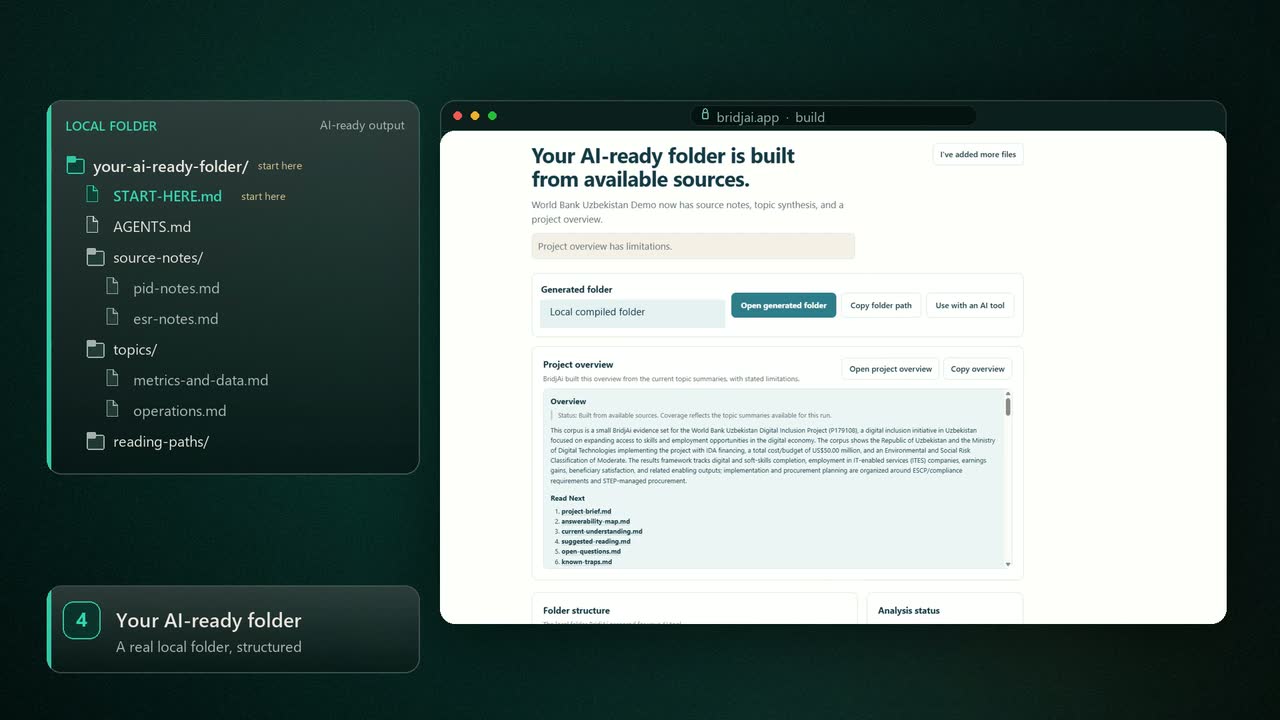
What you get
Your AI tool knows what to read first. If something looks wrong, you can trace it back to the original file. The example below uses fictional project content.
your-project/
Plain files on your computer
START-HERE.md
The project brief and reading order
AGENTS.md
Instructions that help AI tools read the folder correctly
current-understanding.md
A plain-English summary of the whole project
topic-index.md
source-index.md
A list of topics and sources, with links to the right files
topics/
Your material grouped by subject
delivery/
One subject, with its own summary and sources
README.md
open-questions.md
What this subject covers and what is still unanswered
current-understanding.md
What the sources say, what BridjAi inferred, and how sure it is
evidence-map.md
Links each point in the summary to the source behind it
stakeholder-research/
A second subject, organised the same way
budget-and-metrics/
A third subject with its own summary and sources
source-notes/
What BridjAi found in each file
a4c91d28e7b3.md
Key points, exact locations, uncertainties, and anything BridjAi could not read
sources/
Copies of your original files so the AI can check them
How checking works
Project summary
“The pilot programme is scheduled to begin in September.”
topics/delivery/current-understanding.md
Reference
a4c91d28e7b3:key_point:004
Confirmed from a source · high confidence
Notes from the source
source-notes/a4c91d28e7b3.md
Delivery timetable · project plan, lines 42–43
Original file
sources/a4c91d28e7b3-project-plan.txt
Pilot start: September
Privacy
BridjAi keeps your original files, generated source copies, notes, and finished folder on your Windows PC. This website only handles signup and downloads; it never receives your project files.
Topic mapping may send short excerpts from added files that are not yet sorted. Close analysis sends only selected extracted text, standalone images, and rendered page or slide images. Source-backed notes and claims may go to OpenAI or, when you choose it for synthesis, Anthropic. Keys saved through BridjAi are encrypted for the current Windows user. Review your AI service and Windows sync settings before using sensitive material.
Download
Download the app and start with your own files. No account or approval needed.
Free alphafor Windows 10 and 11
Download for WindowsWho makes this
BridjAi is an early alpha. If you send a support message, the person building the app will read it.
Need help or spotted a problem? the support form
FAQ
If you have a few files and one question, upload them directly. BridjAi is for a larger project with mixed files that you will use again. It organises them once, keeps the result on your computer, and makes important points easy to check against the original source.
BridjAi does not upload your documents to its own servers. Original files and generated folders remain on your computer. Topic mapping may send short excerpts from added files that are not yet sorted. Close analysis sends only selected extracted text, standalone images, and rendered page or slide images. Source-backed notes and claims may then go to OpenAI or to Anthropic when you choose it for synthesis. That content never passes through this website.
Codex, Cursor, and Claude Code can open the folder directly. For ChatGPT or Claude in your browser, BridjAi creates a smaller set of files that you upload to a Project.
Yes. BridjAi uses OpenAI to map topics and read selected files. You can optionally configure Anthropic for topic and project synthesis. The app explains how to create an OpenAI key. On Windows, keys saved through BridjAi are encrypted for the current Windows user and are never written into the folder it creates. Each AI provider bills API use separately.
No. The download starts straight away. You can optionally leave your email for new versions and occasional BridjAi updates.
Yes. The release page shows the version, file size, checksum, system requirements, and startup instructions before you install.
Windows first. A Mac build is planned; you can join the update list on the download page.